


Cette page est actuellement disponible uniquement en anglais.
Repairs to 'ASAP Utilities.xla(m)': This workbook has lost its VBA project.... (incomplete Excel setup)
Question
When I start Excel I get the following error message:
"Repairs to 'ASAP Utilities.xla (of ASAP Utilities.xlam)'
Excel was able to open the file by repairing or removing the unreadable content.
This workbook has lost its VBA project, ActiveX controls and any other programmability-related features"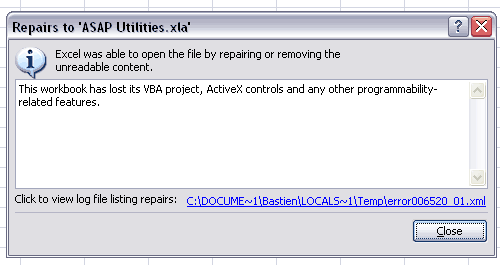
Answer
You get this error because during the installation of MS Office, the "Visual Basic for Application" was not installed.
By default this is installed, but you can uncheck it. "Visual Basic for Applications" is needed to run macros and add-ins such as ASAP Utilities.
Without Microsoft Visual Basic for Applications (VBA) several Excel features in the following categories are unavailable:
- VBA Projects, XLM Macro Code, and ActiveX Controls
- Uncompiled Add-ins (.xla files)
- Menu Items, Toolbar Buttons and Shortcut Keys related to VBA
We still don't understand why Microsoft doesn't make this error message more user-friendly and just tells that Visual Basic for Applications isn't installed.
Quick solution
To solve you can simply change your installation of MS Office and add this feature.
- Close Excel if it is open.
- In the Windows Control Panel choose "Add or Remove Programs" (or Programs and Features in Windows Vista or Windows 7).
- Select Microsoft Office in the list and click on the Change button.
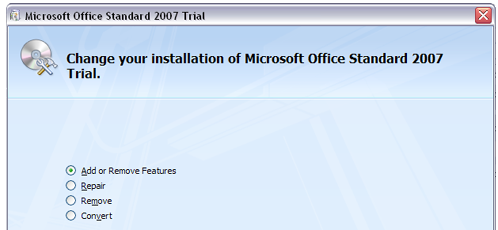
- Choose "add or remove features"
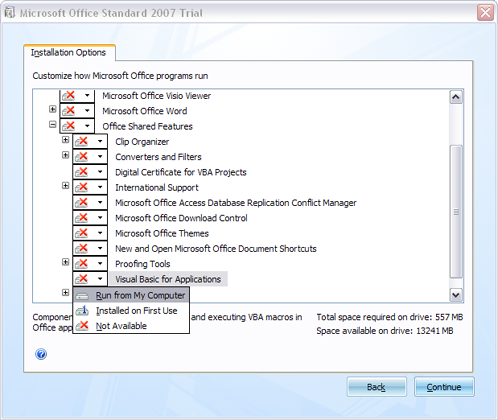
- Select "Visual Basic for Applications" in the "Office Shared Features" list and set it to "Run from My Computer". Then click on the continue button.
- After the installation is finished you will be able to use ASAP Utilities when you start Excel and see ASAP Utilities in the menu.
Additional information from Microsoft
Microsoft has written a few article about VBA in Office:
- Some Excel features are unavailable if you disable Visual Basic for Applications and run Excel:
http://support.microsoft.com/kb/282847/en-us - Considerations for disabling VBA in Office:
http://support.microsoft.com/kb/287567/en-us
Localized error messages
Dutch/Nederlands:
Herstellen van ASAP Utilities.xla of ASAP Utilities.xlam
Het bestand is in Excel geopend nadat de onleesbare inhoud is hersteld of verwijderd.
Het VBA-project, de ActiveX-besturingselementen en eventuele andere programmeerfuncties van deze werkmap zijn verloren gegaan.
Oplossing: In MS Office het Visual Basic for Applications onderdeel installeren, zoals boven genoemd.
German/Deutch
Diese Arbeitsmappe verloren gegangen seine VBA Projekt, ActiveX-Steuerelemente und alle anderen Programmierbarkeitsfeatures.
Spanish/Español
Este libro ha perdido su proyecto de VBA Project, los controles de ActiveX y todas las demás características relacionadas con la programabilidad.